
Free Online Markdown To Word Converter
A free, fast, and secure online tool to convert your Markdown files to Word documents in seconds. No registration or installation needed.
Convert Markdown to Word Instantly
Upload Markdown File
Drag and drop files here, or click to select files
Supports .md, .markdown files (max 10MB)
Edit Markdown Content
Live Preview
How to Convert Markdown to Word in 3 Steps
Follow this quick workflow to upload, preview, and download a polished DOCX made from your Markdown.
Upload or Paste Markdown
Drop a Markdown file or paste your content directly into the editor.Supports .md and .markdown files up to 10 MB, Drag-and-drop upload or instant paste from your clipboard.
Review & Fine-Tune Formatting
Watch the live preview to make sure headings, tables, and lists look perfect.Full Markdown syntax support with instant preview,Edit text and structure until everything looks exactly right.
Download as a Word Document
Export a DOCX file that keeps every heading, style, and block intact.Preserves tables, code blocks, and typography,Opens flawlessly in Microsoft Word, Google Docs, and WPS.
Markdown to Word Formatting Comparison
This side-by-side visual guide streamlines your workflow between Markdown and Word.
Markdown Source Code Example
# Sample Markdown Document
## Basic Formatting
This is an example of **bold text** and *italic text*.
### List Example
- First item
- Second item
- Nested item
- Another nested item
### Code Example
```javascript
function hello() {
console.log("Hello World!");
}
```
### Blockquote Example
> This is a blockquote.
### Table Example
| Name | Age | City | Occupation |
| :--- | :--: | ---: | --- |
| Alice | 28 | London | Software Engineer |
| Bob | 35 | New York | Product Manager |
### Image Example

Converted Word Document Output
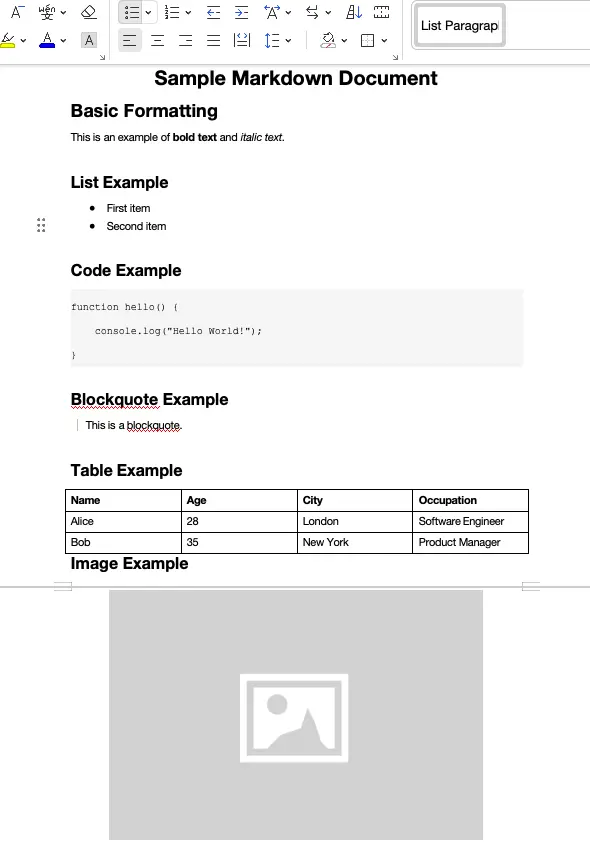
Supported Markdown Syntax & Formatting Guide
Basic Markdown syntax we support
Paragraphs, headings (H1-H6), bold, italic, links, ordered and unordered lists, quotes and inline code are faithfully rendered.
Tables, images and code blocks
Complex elements like tables, embedded images, fenced and inline code remain intact after conversion.
Exported Word formatting quality
Headings map to native Word styles while lists, tables and other structures stay perfectly preserved.
Format compatibility
Export DOCX files that open flawlessly in Microsoft Word, Google Docs, WPS and other editors.
Why Choose Our Markdown to Word Converter?
Absolutely Secure & Private
All conversions are completed locally in your browser, your documents never leave your computer.
Lightning Fast
No waiting for uploads or downloads, instant local conversion completes Markdown to Word transformation in seconds.
Real-time Preview
WYSIWYG real-time preview feature lets you see the final result while editing your Markdown.
Rich Formatting
Supports complete Markdown syntax including headings, lists, code blocks, tables, links, and all elements.
Completely Free
No registration required, no hidden fees, permanently free access to all features.
Professional Quality Output
Generates professional-grade Word documents with perfect formatting and layout, compatible with all major office software.
Frequently Asked Questions About Markdown to Word
Here are answers to common questions about converting Markdown files to Word documents with our free online converter.
Is the Markdown to Word converter completely free?
Yes, our service is completely free with no registration required, no usage limits, and permanent free access to all features.
Is it safe to use the Markdown to Word converter?
Absolutely safe. All file processing is done locally in your browser, and our servers never touch your files, ensuring your privacy and data security.
What markdown syntax does your markdown to Word converter support?
Our converter supports all standard markdown syntax including headers, lists, tables, links, images, code blocks, bold/italic text, blockquotes, and formatting elements. The markdown to Word conversion preserves all formatting and structure.
Is there a file size limit for markdown to Word conversion?
Yes, we support markdown files up to 10MB in size for optimal performance and quick conversion. This limit ensures fast and reliable markdown to Word processing.
Can I convert multiple markdown files to Word at once?
Currently, our markdown to Word tool processes one file at a time to ensure the highest conversion quality and maintain optimal performance for each document.
What's the difference between converting to DOCX vs DOC format?
DOCX offers significant advantages over DOC including 75% smaller file sizes, better compression, enhanced security features, and superior compatibility with modern office suites like Office 365 and Google Docs.
What is Markdown to Word Converter?
Our Markdown to Word Converter is a powerful online tool that transforms your Markdown files into professional Word documents. The Markdown to Word conversion preserves all formatting, styles, and structure from your original Markdown, making it perfect for creating documents and reports.
What file formats are supported for Markdown to Word conversion?
We support .md and .markdown files for upload in our Markdown to Word converter, and you can also paste Markdown content directly into our editor. The Markdown to Word tool converts your content to .docx format, which is compatible with Microsoft Word, Google Docs, and other word processors.
How long does the Markdown to Word conversion take?
Most Markdown to Word conversions are completed instantly with our real-time preview. The Markdown to Word download process takes only a few seconds depending on file size and your internet connection. Our Markdown to Word tool is optimized for speed and efficiency.
Can I use the Markdown to Word converted documents commercially?
Yes, you have full rights to use the Markdown to Word converted documents for any purpose - personal, educational, or commercial. The Markdown to Word conversion preserves content and formatting exactly as you intended, making it suitable for any use case.